Or, why I don’t write on this site anymore.
Why I Journal
When my younger son, B, was born, I wanted to record my thoughts on being a dad to two boys. My handwriting is horrific, so a written journal was not going to support this habit. I had an iPhone, and was already snapping photos of our older son all the time, so the fusion of my circumstances led me to buy Day One for iOS on the (really early) morning of B’s birth, and write about sleeping and feeding and how this all compared to when his brother was born.
Even over five years ago, the UI for Day One was really superb. It had been the App of the year in 2012, and it won an Apple Design Award shortly thereafter that was well-deserved. Writing in it was (and still is) a joy. I could use the form of Markdown I already knew and loved, and the stylesheet looked great. I grabbed the Mac app a week or two later and could write from nearly anywhere. At the time, it only supported a single journal (called Journal) and synchronization was done either via iCloud (buggy as all get out) or Dropbox (super-reliable but a little slow). I chose the latter, and upgraded to the “Plus” tier at some point to be able to have multiple photos per entry and multiple Journals. I used both IFTTT and Slogger to automate my social life and other services into my journal.
A couple of years ago, Day One introduced a Paid subscription tier, as many other app/service vendors have. I avoided upgrading for a long time, but as they started talking about their roadmap (end-to-end encryption, audio recordings, web editing, etc.), I realized that this app’s future was actually important to me. I was using it almost daily, and if I wanted it to be there in the future, it behooved me to provide, in some small part, financial support. Since then, those first two features have arrived and then some, and they continue to be worth every penny.
Realistically, though, these are excuses. I don’t journal just because I like writing, I journal because I don’t want to forget. While I can remember convoluted plot lines of almost any fiction I consume, I struggle to remember precisely what I was thinking about 30 minutes ago, let alone yesterday, last month, or last year. On a recent episode of Hardcore History Addendum, Dan Carlin said something to the effect that, to people in the midst of some event, that event is “the most important” thing happening, but as time separates the observer from the event, and it is seen within the grand context of existence, that event is somewhat unimportant. Even historical figures like, say, Aristotle, may have just been some guy yelling in a marketplace, but with a good publisher...
In any case, I journal because I know I’d forget details of my life that have monumental value in the moment and which may have some value to future me. When I look back at these writings through the lens of time I get to re-live some of that weight and re-learn some of the lessons I was learning then. That has supreme value to me.
What I Journal
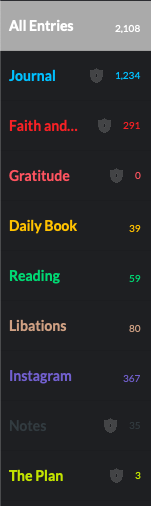
I use Day One for, at the moment, 8 major categories of things, and these line up with the individual journals that I have:
Journal
This is where I do general journaling about life. It’s for things I’m thinking about, for when my kids do something cute, or for when I take a nice picture of my dog that I want to capture. This is what a “journal” might be if I only used it for personal activity and life commentary.
As I take photos on my phone, any good ones, or any that catalog what I have been up to recently end up in Journal with a paragraph or two about it, why it was momentous, etc. I liberally tag my entries with people’s names, topics, event groupings, etc. I’d love to have richer tagging for people to make a mini/personal social graph of people and places and events, but that sort of scope creeps beyond a journal and I like that Day One focuses on what it does best.
I automate hardly anything into Journal, save podcast notes which are templated by sharing an Overcast link with a Shortcut that pulls down all of the metadata and formats the entry. All of the rest of this content is created by me. I do enjoy the Activity Feed view in the iOS client as it helps me catch up and write entries about places and photos of the last few days.
Faith & Scripture
This journal is for sermon notes, Bible study notes, thoughts on a verse of the day that I want to capture or highlight, things where I see God clearly doing something in my or someone else’s life that I want to remember, etc..
I have a particular format for some entry types and I am really looking forward to in-app templates that I can use for that content. I tag each book of the Bible mentioned in each entry, as well as any themes, study plans, etc. So far Genesis has the most uses followed closely by 1 Corinthians, but that’s mostly because every time I start a chronological study, I am really diligent about journaling my notes and less so over time. I found the F260 method earlier this year and that’s certainly helped.
I don’t automate anything into this Journal. I would love to see an integration between The Bible App - YouVersion and Day One so that my highlights and notes could be brought over. I considered building a Shortcut for it, but it’s not too many fewer steps to copy and paste than to share to a Shortcut.
Daily Book
This is an inconsistent attempt to write a summary of my working day. I earnestly tried to write this for about a month. It was useful at the time, and I should get back to it. It’s another use case for a structured template.
I semi-automate the creation of these entries with a reminder template. When the editor switched out of Markdown to rich text, though, the template got all wonky. My ideal world is one where, every morning, some service or process creates a template with the content I want in it from Google Calendar and Todoist and then places it in my journal to be filled in throughout the day. This journal isn’t encrypted so that might be possible with the CLI. A project for a rainy day, perhaps.
Instagram
All of my wife and my Instagram feeds dump our photos here via IFTTT. I add/edit tags after the fact to include people’s names that we wouldn’t tag on Instagram, like our kids. I’d love for Day One to support multiple Instagram accounts so that I didn’t need to have multiple IFTTT accounts to cover all of these feeds.
Reading
This journal is for any time I am reading a book and want to quote something, or I am reading something on http://instapaper.com/ and I highlight it. The Instapaper entries are created via IFTTT as one per highlight, so I go back later and consolidate.
To capture text from physical books, I use either Scanner Pro or Prizmo Go. Both work pretty well and I haven’t settled on one that I prefer. I don’t use tags much in this journal.
Libations
My whisky (and Scotch and Bourbon) tasting notes go here. I use a 5-star rating system, tag by rating, region, variety, etc., and write my thoughts on the liquor. I have a few beers in here also, but it’s mostly whisky and whisky-like drinks. I’ve used a handful of iOS apps for this purpose before, but their providers all fall into dis-use over time. My notes are really for me, anyway, but I’m always happy to share.
Entries into this journal are 75% automated via a Siri Shortcut that I wrote. In addition to needing to write my own notes for obvious reasons, I also have to have a photo already in my photos library, though I suppose I could modify it to let me take a new one at the time. There is no searchable whisky database I could use to back-end my creation process. That would be nifty.
Notes
This is for general notes which I want to be more permanent. Notes from one or more transient note applications end up here if I want them to live forever. More on this in a bit.
The Plan
My wife and I are starting to look at other properties. So far there are only two entries; we’re not that serious yet.
This journal is almost entirely automated. I wrote a small python script to scrape relevant details out of a Zillow listing and shove them into a journal entry that I can go back and write about later. I share a listing to a Shortcut and the entry is created in a few seconds. Right now my script is running on PyhonAnywhere, but I will probably move it to run only locally via Pythonista.
As we get more serious I’ll probably start using the audio recording feature to capture our thoughts as we walk around a property or as we leave.
Gratitude
(Wait, that’s nine…)
I’m reading through The Gratitude Diaries by Janice Kaplan right now, at the recommendation of the Day One community. It’s a pretty good read, and I think I’m going to give her method a shot in 2019. So that’s one more journal, but I haven’t started that yet, so it’s still technically 8.
Day One as the End Game
So I use Day One for a few things, eh?
In an article on The Sweet Setup, Josh Ginter wrote about for what he uses each of Bear and Day One and why they have different places in his tool belt. I admit that Bear is useful; I drafted this post in Bear, for instance, but ultimately Bear is transient for me, much the way that Apple Notes was for a long time. What he says rings true to me, too: Day One is the end game; anything that I want to have last for any reasonable period of time finds its way into Day One. Bear is for meeting notes and packing lists and drafts of things I will eventually journal.
That’s where my Notes Journal comes in handy: for those notes (that were originally) in Apple Notes or Bear which have long-standing purpose, there is a specific journal where they end up. If Bear disappeared tomorrow (read: the day after I publish this draft) there isn’t much I’d miss. If Day One were gone, I’d be crushed.
That concept is what underscores the purpose of Day One in my life: it is a commonplace book, as another Sweet Setup writer put it. I automate the process of funneling my other creations into Day One so that I have one place for things. I don’t care that Instapaper has my highlights, for instance—they have been copied into Day One and that’s where I read and review them anyway. I used to be a Pocket user and only switched because Instapaper had highlighting that I could put into Day One. It looks like Pocket can, now, too, so one day I may end up switching back. The initiating platform is unimportant; the result is what I care about.
A note about encryption: I’m a big fan, however as you might expect, an encrypted journal cannot be written to by external automation systems, such as IFTTT. This means that my default is that a journal should be encrypted unless I plan to automate entries into it. Automation from Shortcuts still works regardless of the state of the journal, so long as I’m willing to open Day One at the end.
Memories
As I said when I started this post, though, the other, and really more important reason why I do all of this, is so that I remember. My natural memory is shockingly poor at times. I have a very hard time remembering events or remembering what I was thinking when something happened, or my rationale for a decision. Journaling gives me a chance to capture that information and then re-visit it on occasion.
Day One makes this all the easier with the “On this day” feature, which ranks as pretty much every user’s favorite thing about the app. Every single day, I look at things I wrote between one and five years ago on that same day. It’s humbling to see where we all were in life even just one year ago. The most amazing is 3-4 years ago when my kids were at very different stages of life. These are the years my mind has found easiest to lose track of and without this journal I would not regularly have the joy of looking back on them at those ages.
Memory is a funny thing. As prideful humans, we think that our memories are indelible, especially events we consider particularly important. A study was done in the aftermath of 9/11 where people who were in NYC and up close to the event were asked to describe where they were that day, on the one year anniversary, at two years, at five years, and finally at ten years. They were then shown what they wrote at each of those increments. Most whose depictions differed over the years were adamant that they could not have possibly written what’s they wrote at the one year mark, that their memory now was clearer, and that their writings must have been altered (despite agreeing it was, indeed, their handwriting...).
We really do give our brains too much credit. Instead, as we get further removed from an event, our brains fill in gaps with other things people have said, other events we have experienced, or even just crap it made up. When we try to look back on past events, we need to remember that we look through a mirror darkly, not through a magnifying glass.
Unless, that is, you wrote it all down!
In my case, on the morning of 9/11/2002 I wrote down what happened on that day one year prior. I have a journal entry long-ago-exported from LiveJournal which survived imports into my subsequent MovableType- and then Wordpress-based blog(s) and several years of languishing in a mysql db export. I know pretty well what happened in my life that day because I can read about it and refresh the gaps in my fuzzy memory with my own words.
Forgive the writing style… it was 16 years ago. Names changed for privacy:
When Flight 175 barreled into the South Tower, everything stood still. It was the first one I watched happen on CNN. I woke up around 8:55. My friend [Jill] had something in her [AIM] profile about “my heart goes out to all the families..” I got spooked really quick. My energy went, and I turned to the only authoritative news source I could think of, msnbc.com. There I saw pictures of the North Tower, and was impressed that... wow... this happened about 8 minutes ago, and there's an almost full spread on it.
I tuned to CNN as the maintenance dude knocked on my door to fix my rug (it was bunched up in front of my doorway). We both watched CNN as the South Tower was hit. Then it was 9:04, and the panic continued.
It was a long day at work, even though we closed early. Many of the staff watched CNN on the TV that was normally reserved for Printer and Public Site status reports. I kept #news rolling on IRC b/c it was many times more up to date than cnn or msnbc… those sites were smacked pretty bad that day.
I tried calling [Jess in NYC], but the phones were all a mess. Thankfully her building hadn't lost its internet connection, and she was online.. 'scared to death' but still alive.. that's all that mattered to me. It was only a dozen blocks from where she slept.
We kept asking the consultants if they had family in NYC - many do. It took a few days, but everyone's everyone was accounted for. I called [Allie] to make sure her dad was ok, and he had been in Disaster Mode at [redacted place of work] all morning, but he was fine. Everyone I knew was ok, but I'm a lucky one.
God be with us.
That day is mostly indelible for me because I made the effort to make it that way, and I re-read that post on 9/11 every year because I put it in Day One a few years ago, so now I see it every other! There wasn’t much effort to do this. It was worth it for that memory, and is worth it for the others that I capture as my life has changed since B was born. A lot has happened since then, and it is a real blessing to to be able to read about it and feel some of those feelings again.
What Next
I do have some regrets that I didn’t start this all sooner. I am down to a single grandparent, for instance, and I have lost a lot of memories from my childhood for not having been a faithful journaler at a younger age. The journals I do have from my adolescence are hilarious, embarrassing, and should be used as fire-starter. My other LiveJournal-era entries are similarly embarrassing for the most part.
That said, there are more things being considered in the app that I am looking forward to:
- More and more functionality for audio recording. This has been an amazing addition to the tool belt for me. I record a post every now and again while walking the dog. If it’s short enough, Day One transcribes it for me and I can edit it after the fact. It’s hard to type when walking a dog, as you might expect. I’m planning on buying an Apple Watch Series 4 in the new year to replace my aging Series 0. One of the features that works on the newer watches is that you can natively record audio on-device for up to 90 minutes. This will be a game-changer for me. When I’m having a chat with one of my kids that I want to remember or when my wife and I are wrestling with a decision, or when I cannot take notes on something someone is saying, I can revisit it later and also not worry about its privacy due to the end-to-end encryption of my most sensitive journals.
- Video support. Most of the videos I take with my phone are there to chronicle a short event. I don’t want them on Youtube or another hosting service, and for now they are “collecting dust” in a Dropbox folder tree. Adding video support in Day One would be supremely helpful. I have converted some very short videos to GIFs to make an entry more “alive”, though, and that’s nifty.
- Shared journals. This is one extension for my “The Plan” journal which would open up a lot of potential. My wife, who doesn’t use Day One much, could open the same journal and add her thoughts.
Again, Day One is the end game. It’s where all of the stuff I want to keep track of ends up.
I would like to automate more things into Day One, but I’ve reached the limits of my digital life for now. There are numerous inspirations out there for automation, for example:
Why I Don’t Blog Anymore
And now we come to the payoff…
A colleague of mine asked me what my next blog post was going to be about way back in May. I was sure I would write about the treehouse I was going to build, but I never really wanted to share it like that. It was a rushed process that I over-engineered, and I wasn’t sure how to describe it. I sure do have a ton of journal entries about it, though, and that is why I do not post here any more: most of my written thoughts are for later recall and not for public consumption. I don’t have any need to share them, so I just do not.
It’s not healthy, though, to keep everything inside. I firmly believe that the best life is one shared with, and especially in service to, others, however that doesn’t mean I need to blog more. It means that I need to share life with people 1:1 and 1:several. A customer of mine stumbled upon this blog and mentioned to me that he liked what I posted and would enjoy seeing more. I get it; I consume other people’s writing all the time and would it not be fair for some to expect me to share alike?
Despite being an extrovert, this isn’t the medium I want to contribute my thoughts to right now. I could make an empty promise to the ether about aiming to write more, but who am I trying to impress? I am definitely going to journal more, but I promise nothing about this place.